Showing posts with label Tutorial. Show all posts

Monday, April 20, 2015

Altered ribbon spool - tutorial

Hi friends,

I wanted to share a tutorial I had up on the Fancy Pants blog recently.  It is a clever little altered project that popped up in my Pinterest feed a while back.


I started with this simple spool of ribbon 1.5" ribbon, that I picked up at the Dollar store, and a couple of embellishments from the Flutter collection that I thought I may want to use. 


To begin, I removed the entire length of ribbon form the spool, and then used my craft knife to separate the "lid" or top portion (where the price tag was located) from the spool itself.  This will expose the round cavity in the center that makes up the spool on which the rioon in wrapped.  I then decorated that top portion by cutting a round piee of patterned paper just slightly larger than the top of the spool to make it easier to act as a lit.  Cutting this piece larger than the "lid" itself, also gave me more space on which to add my embellishments (see the 1st image above).  You can also see in the photo above that I decorated the bottom of the spool in the same manner, and covered the plastic spool section with a strip of patterned paper.  


To create you photo strip, simply cut your selected photos into circles small enough to fit inside the cavity of the spool.  In this case my spool was slightly larger than 2.5 inches, therefore my photos measure exactly 2.5 inches in diameter.  Cut the same number of circles out of coordinating patterned paper, to act as the backing to your photos.

Remember that ribbon you removed from your spool?  Grab it and lay it down on your work surface.  Measure about 2 inches of ribbon and mark that spot.  It is at this point that you will glue the top of your newly altered lid.  Next to that, leaving very little space in between, begin to glue down your photos, neatly and straight, keeping the ribbon lined up directly in the middle of each photo.  


Notice that I cut just a few more blank pieces of cardstock to act as journaling cards, randomly placed in between some of my photos.  I even decided to make a title page to my album, as it just made the album seem more complete to have one.  
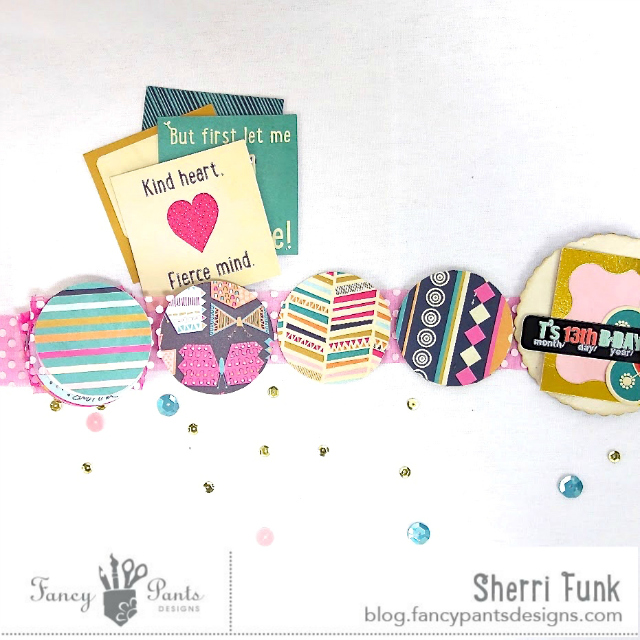
This is what the back side of my photo strip looks like.  Nothing fancy, just coordinating patterned papers from the Flutter Collection backing my photos.

Once all your photos and backing are added to your ribbon strip fold them up accordion style, like this, and tuck them into your newly altered ribbon spool container.


And there you have it, a sweet little photo box of sorts to store all your precious photos, and memories from a noteworthy even in your family.  This one is currently being loved and adored by my girl.  Thirteen is a pretty special birthday, and this little photo collection captures all the fun, and giggles, stories, and gifts, food, and friends with whom she got to share her special day.  

Thanks for stopping by today friends!


Pin It

Tuesday, January 28, 2014

Chic Tags and a You Tube Tutorial

Happy Tuesday friends.  I'm sharing a post I had up on the Chic Tags blog yesterday.

In case you've somehow missed it Chic Tags has been putting together fun little kits of journal cards, flair buttons and such each month. The December kit was totally great, but somehow in my December scrapping, I just never got to break it open.  I pulled it out last week, however determined to use it up.


Here is a perfect example of the great job Veronic and Albert do creating kits, that go with the current month's possible celebrations, but also your everyday pictures.  The Christmas kit, had a wonderful colour combination, and worked great for this layout, even though December is long behind us.  I pulled out a few other coordinating tags and went to town on this layout of my hubby and I enjoying our favourite past time.  Cheering on the Winnipeg Jets live at the arena.
 Here I've stitched a tag from the School House Collection to one from the December Kit.  I love the added surprise you get when you pull the card from the envelope to read the hidden journaling.
Even though "good cheer" is pretty synonymous with Christmas, I thought it was a pretty good fit for a sports fan themed page too.

Interested in how to create this background using the Silhouette Cameo and this freebie Chic Tags cut file?  Check out my YouTube tutorial here if you're interested.


Pin It

Thursday, September 26, 2013

Pinterest Inspired

Had this little tutorial up on the Scraptastic blog earlier this week.

Our Scraptatic kits often include washi tape, and I'm not always sure how to put mine to use.  When I found this washi tape banner on Pinterest, I thought it would be fun to recreate it on a layout.
source
I simply grabbed a length of American Crafts jute.  And tore off about a 3" length strips of washi, folding it around the jute and adhered it to itself.

Once my banner was complete I created the base of my layout.

I then placed my handmade banner where it worked best.

You'll noticed I went with the traditional pennant style rather than the basic triangle shape for my banner.

And here is my completed layout.
The Quote is also a Pinterest source.
I used both the We Are Family Main Kit and Add on Kit featuring the Teresa Collins Family Stories Collection, to complete this layout.

Has Pinterest inspired you lately?  What have you created with that inspiration?  I would love to come over and have a peek.

Thanks for stopping by today friends.  Have a wonderful Thursday! Pin It

Wednesday, September 4, 2013

Scrapbook & Cards Today

I'm back up at Scrapbook & Cards today with post number two of two.  If you missed the first one, my introduction to layering you can see it here.

Today I am breaking down my process for creating with multiple layers on your layouts.  Here is a sneak of what you'll see on the blog today.
I hope you'll pop over to the blog to see the rest of the layout and have a little peek into my design process.  A huge thank you once again for Catherine for having me, I enjoyed hearing back from her readers, and hope to see some link up with their take on layering.

I'll be back on Friday with some Project Life layouts to share with you.

Until then. Pin It

Friday, August 30, 2013

Creating Your Own Resist Paper

The fabulous Miss Heidi Swapp. shared with the world how to create your own resist paper a while back.  I gave it a try for myself back then when I discovered it, and thought I'd share with you here how I did it once again for Chic Tags using something as easy and affordable as Mod Podge.  I gave it a try a while back, and wanted to let you all in on the secret too.

To begin you'll need the following supplies.
background paper
Mod Podge
mist
sponge brush
a mask
some paper towel
a heat tool for drying

Position your mask onto your background paper, and add a little Mod Podge to a painters palette (or paper plate, or even a scrap piece of cardboard)

Use your brush to spread a thin layer of Mod Podge onto the mask.  In my case I wanted to create a resist that was only a touch here, and there.  This is what your page will look like once you remove the mask.  Cool right?  Barely visible, but you can still make out where the resist will be.  Now it's time to add the mist to the areas where you've applied the Mod Podge, and remove the excess from on the Mod Podge using paper towel.

This is what your background will look like once you've wiped all the excess mist away.

As I said earlier, I tried this technique a few months ago for the first time, and this was the colour I chose back then.  For Chic Tags I created a brand new project and used a different colour to create my resist.  

Here is my newly created project, mixing the resist technique and fabulous Chic Tags products.

A close up of the resist pattern
Layered goodness to my heart's delight

I placed the Date Tag in a glassine envelope to be able add/hide the journaling.
There you have it, easey peasy right?  I hope you're able to go and try this technique out for yourself.  Are there any techniques you've discovered recently that you think are worth sharing?  If so, I'd sure love to hear them.

Pin It

Wednesday, August 14, 2013

Library Pocket Cut File

I had this post up on the Chic Tags blog the other day, and wanted to share it with you too.

I downloaded this Freebie library pocket cut file from the the Chic Tags store to use on a layout.
Have you had trouble trying to figure out how to download freebie files for your own use?    I've created a little You Tube video to help walk you through the process. Click here to view the video if you'd like a little tutorial on Trace & Cut for the Silhouette Cameo.

I also created a video to show you how to add perforated lines to the library pocked for easier folding, like this.
You can check out that video here.


Here is how I used the cut file on a layout.
Stopped in a farmer's field on the way home from the lake the other day to grab a few photos of the girls against the giant hay bales.
Like that cute little star cut tag?  It's another Chic Tags freebie, you can grab it here

The colours of the new Echo Park Hello Again collection worked so well with Chic Tags products.
Lots of layering of the tags as usual.
I hope you've felt inspired today.  Lots of freebies to add to your collection, a couple of tips and tricks, and a little eye candy to boot.

Thanks so much for stopping in today friends.  Leave me a comment letting me know if there's anything you'd like to see covered in a Silhouette video and I'll try to make it happen for you.  

Have a great day!
Pin It

Monday, July 15, 2013

Sunshine Fun

A little something I'm sharing with Chic Tags fans.

I've had these freebie cut files that Albert created exclusively for Chic Tags sitting in my Silhouette library for sometime now.  This week I was determined to use them on a summery layout.  My oldest daughter was done school earlier than the younger two this year, as exams start about 2 weeks prior to the last day of school for Elementary school kids here.  One afternoon she decided to give a Pinterest idea.  She surprised her sisters with an afternoon snack of homemade, all natural popsicles.  It's not often that she's so thought ful with them, so of course I needed to document the occasion.  Here is how the cut files look on my page.


In case you haven't seen them yet, these are the freebie files I used.
Grab your free files here
I chose three of the four 3x4 cards to cut directly into the background sheet of my layout.  I then created my design around those two cuts.  
I actually used the sunshine card as part of my title, and backed  with a scrap piece of My Mind's Eye paper.  I used yellow on side A to fill in the rays of the sun and the grey on side B to back the word "sunshine"
These Bunting Alphabet is one of my favourite Chic Tags sets .  Here I used them to create the second part of my title, stitching them down with my sewing machine.
I backed the "love this" card with the same yellow piece of My Mind's Eye paper.
Once I was finished adding all my bits and pieces to my layout I felt it was still missing something.  To add one final touch and ground the layout I went back to my sewing machine and added a small frame to group everything together.   And voila, a fun little summer memory captured and added to the books.

For those who are not sure how to cut a 3x4 card directly into the background paper of your layout.  I've put together a very simple, and short video for you to follow.  You'll see it's rather simple to do.  You can check it out here.


I hope you've been inspired to go and create something beautiful today. Pin It

Friday, March 1, 2013

Happy Birthday Let's Get Sketchy!


Let’s Get Sketchy is turning ONE and to celebrate we are having a Birthday Bash Blog hop.  As you make your way along our hop to visit each of our DT blogs you will find lots of birthday inspired projects.   If you have arrived here from Tracy's blog welcome to the LGS blog hop!! If you have stumbled across this by chance and want to play along then you can head back to the Let's Get Sketchy site to start at the beginning and to start collecting your Birthday challenge words. These words should be bolded on each DT member’s pages.

I thought it would be fitting to create a post showing you how I created this page in celebration of my daughter's 10th Birthday.

First, I gathered any product I had that seemed fun, and celebratory. Including Create Paper's Pretty Party Collection, and Evalicious flair badges.

Then I made a 3x3 micro mini album to attach to my layout, to house additional photos from the party

Cut 2 - 3x12" strips of card stock.  Accordion fold each one, and attach with double sided tape

Add photos and patterned paper

Add a 4x4" cover created from chipboard, covered with patterned paper, and decorated to co-ordinate with your 12x12 layout.
 Attach micro-mini album to your already created layout using double sided tape

Here is HOW my completed layout with micro-mini album attached looks
Thanks for hopping by, your next stop on the hop will be Marit's blog.  
In case you get lost along the way here is the hopping order. Don't forget to collect your secret words along the way to enter for a chance at a little some extra birthday goodies.
  • Line up:
    MY BLOG
    LGS


    And what's a Birthday Celebration without gifts right. The fabulous Andrea from Cre8tive Cre8tions has provided me with some extra flair badges to offer up to one of my lucky readers, just for this celebration.  
    Leave me a comment telling me you'd be interested, and I will choose one lucky winner from among those comments to receive a fabulous assortment of flair badges and announce on Monday, March 4th. Please make sure to leave me your email address, so I can contact you directly!

    Happy Hopping, hope you feel inspired to link up for your chance at a boat load of goodies to be handed out all month long.
Pin It

Wednesday, February 6, 2013

Coffee Filter Ruffles & A Winner

Happy Hump Day friends!

Last week, while searching for something to share over at Scrapping Everyday Miracles, I discovered a tutorial that I thought was so cool, I just had to try it right away: coffee Filter Ruffles.  You can see the link that I first discovered here.  I was so inspired by it, that I just had to give it a try right away so I could share it with today.

These are the images that got me so excited.
Cut the centre out of a few stacked coffee filters


To create your own ruffles follow these easy steps.  Grab a few coffee filters, and cut out the centre.  I'm saving my centres to use on another craft someday.  So I had to give it a try for myself.  I thought the ruffle layers were a little large though, so I cut them in half, both lengthwise and widthwise.

 I then grabbed a handful of Studio Calico Mr. Huey's 
and began dying the ruffles one at a time.

 End result looked like this.  I did end up adding an extra shade of green.  

You'll notice that the coverage is a little splotchy in some areas. 
I decided not to worry about it, but just to go with the flow.

Using double sided tape I covered the bottom, front of the card and began layering.  
I snipped off the parts of the ruffles that were over hanging.
To finish it off, I simply added a couple little embellishments, 
and voila, a happy little card to add to my stash.

Have you ever seen a tip/technique or any idea that got you so excited you had to try it right away.  If so, link me up I'd love to see what inspires you.

Lastly I have a winner for my Kiwi Lane Designs blog hop.  I want to thank all of you for stopping by and commenting, and especially those that became new followers.  I hope to continue to inspire you with quality, and creative projects throughout the year.


Congratulations Valerie!  You have won my set of Tiny Accents Templates, and some fabulous Love Notes tags from Chic Tags.  Please send an email to sherrifunkATgmailDOTcom with your snail mail.  And I will get your prize out to you asap.  If I do not hear from you by Wed February 13, I will choose another winner.  Congrats again!

I am off for a quick trip to Mexico tomorrow.  Just me and my hubs, really looking forward to some time away, just the two of us.  I hope to have a few photos of sand and sun for you next week.  Until then, enjoy the rest of your week everyone, and thank you so much for stopping by today. Pin It